Hole in the sky?

My name is Major.

Saturday, October 10, 2020

Baulder’s Gate 3.. cheat?

Baulder’s Gate 3 Boulder Trick?

    I was having an issue beating up on the ogre trying to bang in the old house, where you interrupt them about to make a half ogre. Here: https://youtu.be/X89MAXFcnvU

     Right to the left of here is a small cliff side with several “Loose Boulders” I noticed you could throw them extremely far, so my plan was to get a few and wing them at the giant titty ogre when she comes out one-shorting my party.

     I knocked on the door and boom, here comes Bertha, full pissed off having interrupted their disgusting coitus. I tossed the first boulder but she was right on top of me as I did it. It only did like.. 5 damage with a 70% chance to hit. The boulder fell right back next to me. 

     I then picked up the boulder an unlimited amount of times and threw it on her until she was dead. No extra turns needed, just keep throwing the boulder to do infinite damage based on what kind of time you have. You never have to end the turn or do anything except click on the boulder, select throw; and do it a ton of times. If she (big tits ogre bitch) is inside the house and you attempt this, for whatever reason this causes the ogre to get stuck in the ceiling unable to take actions until you kill her. If you use multiple boulders, they will stack up and the enemy will be magically Levite’s one boulder-height with every toss.. and yes you can climb on said levitating boulders to get to places you would not be able to normally. 

     So I got curious. What else can I kill with a boulder? The mega spider thing with like 200hP? No problem. Bosses? Child’s play. As long as they want to get close enough you can kill them all in one turn. Throw boulder, walk up next to them and just keep picking it up and throwing it over and over. Never fails. All those knolls in the hillside nearby? No problem, however one of them fell through the world and started spinning a thousand miles per hour. Mileage may vary. 

Saturday, September 5, 2020

Battle Angel (1993) - Full OVA


Link in case embed does not work. May be age restricted. English dub.

Awesome OVA and even better Manga. Live action movie was good, but this was great.

Wednesday, February 19, 2020

Fast internet.. will it get me in trouble?


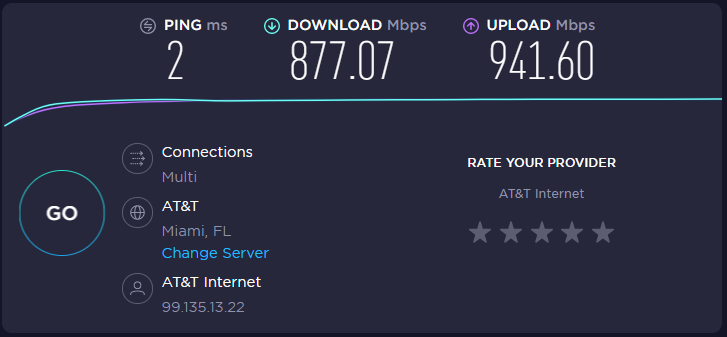
     Let's call it boredom. I wanted to see how fast I could download a file, as I have pretty good internet and wanted to see how fast it would actually go. For the record I have 1.2gb Fiber both up and down, I'm 2 feet from the source cable, and my cord is less than a foot long coming out of the router. Different speed tests has me clocked all over the place, but here is an example from 1 minute ago from that ookla website, download packets from Miami, the closest major city.  


     My wife is watching the debates on sling, and my son is upstairs hacking the planet. I could run this 100 times and get wildy different results so I just went with the first one. 


     I then tried to download some test files from various sites, but their hosting is awful and could not keep up with what I'm throwing down. The best I got was 10.4mbps. I decided to do something LEGAL. I'm going to partially download a movie file from a torrent. A movie that I've already paid to own a copy of. Go here to read the legality of downloading a copy of media book or movie that you already own. For the record, I bought the movie Bladerunner 2049 when it was first available digitally, I'm a huge fan, and own the first edition signed of "Do Andriods Dream of Electric Sheep". Previously, my wife has given me shit for downloading torrented movies, as they send you an email, whether you owned the game/movie/book or not, they don't know, they just sent the email anyways. 

     I'm not going to post screen shots of the download, but let's just say, I documented a 31.7mbps download from a torrent of said movie, and stopped the download at 17%. I selected delete data and torrent, and went on my merry way. I never downloaded the whole file. The real experiement, which I'm not sure I want to know or not, is whether we get the email of death in the morning for legally downloading a movie I already own, and I get yelled at by my wife. Of course I saved a screen shot of me only downloading 17% of the file. Of course I'm playing with fire, and by fire, I mean the consequences of an irate wife who has warned me several times before not to do this exact thing.

    But.. I had to know. 

*Edit*
It did not get me in trouble. Not sure why, but my wife is not mad at me.. for this. 


Thursday, January 16, 2020

PodCast of the Month: The Pink House Tapes


Deep Learning Neural Net AI Summons the Ghost of Ric Flair


Yeah so what I made this blog too. I'm bored.

Love text adventure games. Huge fan. Ever since Zork and Dragon Riders of Pern on C64 I have been a huge fan. Still dabble in some BBS Door games once in a while still. This game really got my interest. Check out the link where I steer the AI to strange places and see what will happen.


Sunday, June 9, 2019

Why the Apple $1000 Monitor Stand is fine by me


     Over-engineered aluminum stand: $1000. Let's not forget the optional $200 VESA mount of you want to connect to something else.. you do have a choice, let's not forget about that.


     It's connected to a $6000 monitor. Yes you heard that right; Apple's professional monitor offering cost's more than a used car. It's 6k(ish), HDR compatible, and some of the most accurate colors and blacks you will see in a monitor.. but $6000.

     The customer for both of the products above is not the same customer that buys a mid range to low end Macbook pro. This customer is not going to buy the new Mac Pro cheese grater without the dual video card option and 128 GB of ram, they are going all the way, because they have the money to spend, and why the the fuck not. This is not marketed towards college kids trying to make music or basic graphic design.. no way. Is Apple going to piss off some people with a $1000 mount? Sure. But they were never trying to be attractive to that particular consumer anyways. 

Video Card Upgrade Progression - When to upgrade


     When is it time to upgrade? What exactly do you need, how much to spend, how much ram... the list goes on. I was reading a post on r/nvidia subreddit, and I saw a small trend: people posting pictures of their video card purchases through progression. A few posts it seemed like 5 or more years went by, but the majority, only 1 or 2 years max. One picture in question:


   Two cards from the same release generation, and another card, the RTX 2080TI being the new hotness. Back to the original question.. when is it time to upgrade? I put together a small list of questions I ask myself around what I think would be upgrade time.

1) Do you play games? 
2) Can you not play the game you want to play in the resolution and/or frame rate that you would like?
3) Can your monitor support various functions of an upgraded video card?
4) Can your current hardware handle a new video card without bottleneck issues?
5) How much money would you like to spend?

     At right about question 4, I think you would tell yourself you are due for an upgrade. Do you play games? Not that playing games is required for needing a video card, you could use enhanced graphical capabilities for a number of work related reasons, alas, the majority of people buying these cards are using them for gaming. Sometimes you buy a game, a good recent game that needs a little more horsepower. Your current card seems to groan under the pressure and frame rate suffers, rendering it all buy unplayable. The quick and easy solution is to buy a new video card. Questions 3 & 4 seem to be very related, so lets keep them in the same bucket. If your existing hardware is not compatible, upgrading is off the table. An old crusty CPU that is 5+ years old may hold you back in the gaming department, and using that same 1080-60hz monitor may not be the best choice to take advantage of your new buttery smooth frames.

     My suggestion? Buy something a little better than you need that has solid cooling and reviews. My video cards typically outlast my computer setup in most cases. There is no reason why a computer/video card can't last 5+ years in today's market playing triple-A titles how they were meant to be played. In the market for $500, trust me, just save a little bit more and get the next step up. You may not see the difference right away, but you just saved yourself an upgrade down the line.


Monday, June 3, 2019

Elder Scrolls Online Disk Space Issues


     I'm downloading this game, after not having played it since closed beta. My wife saw an advertisement for the new expansion and wanted to try it. While waiting for it to download, I googled random things about the install process as I typically do when downloading something new. 85 GB needed for new install? Not too bad for a modern game, on par with what I have seen. Clicking links and reading on the forums, people complained of it needing, much, much more. So I cancelled the download, and monitored it closely this time around. Note: I have ultra fast fiber optic internet so the download is quick, so it was not too big of a deal. What did I find out?

- ESO says it requires 85 for install.
- The above fact is final install after cleanup and patches. I found this to be accurate within 10 gigs. Not bad.
- The core game is 58.5 GB, the main patch is 56.8 GB, and the final patch was right around 16 GB. That's 131 GB. 
-When the last patch is applied, a clean up process happens in the background, leaving the install back at a modest 87GB.
- If you have a 120GB solid state drive that you have and you want to install this game on it, well, don't. You wont have the space for the game to work with. Install it on the main drive and copy the Zenimax folder over when its done and you should have no issues. 

Hope this helps. 

Monday, April 29, 2019

Demon of Steel (1987) (Anime) Full Movie!


     Hey! Let's watch strange anime together on YouTube for free. I'm currently watching this, and so should you. So far I dig it.

**Update 5/30/25 - Fixed the video link! The site is old and shit is broken, I'm dealing with it and you should too.**

If you cant see the embedded based on where you live, here is the direct link. 

Press F to pay respects [Game of Thrones]

Well this explains a lot. [Apex Legends]


When you get shot once by something trivial and it feels like there is multiple bullets shooting you?
When you duck around cover or close a door, and then you get shot afterwards?
When damage seems to accumulate when you got shot a few seconds ago?
Feel like your running through quicksand?

     Anyways, see above for the average network lag, Apex being the worst in class, no surprise there. Their forums range from, "I can't seem to shoot anyone", to "Why do I die with purple armor on by one pistol shot.", and other magical comments. Sorry, I'm going to pour gas on this unoptimized piece of garbage. I'm glad its losing popularity.

Monday, April 15, 2019

Cable Management

Inside your computer? You should give a shit.


Outside your computer? Who gives a fuck.